How to / How I bullet journal - updated (click to expand)
I recently looked at my older "How I bullet journal" guide, and it wasn't very good, but I have also changed/improved how I bullet journal since then, so that's why I'm making this guide. I do want more people to get into bullet journaling, So I'm gonna try to make this guide a good resource.
If you want a basic idea of how to bullet journal, I would highly recommend watching Ryder Carroll's Intro guide on the topic, one time before you read my guide, and another time as you follow along with my guide. He's the one who created bullet journaling. He also wrote the book "The Bullet Journaling Method", which is a really good resource if you want to continue learning and improving with bullet journaling. Alright, let's begin.
Supplies
The great thing about Bullet Journaling is that all you need is a notebook and a pen. I would recommend trying to find a notebook that is spiral-bound, hardcover, lined, and has thick pages. I really like this one from dollarama.
Setting it up
So. Before anything else, make sure to number every page. Put each number in the bottom left on left pages, and the bottom right on right pages. Next, We will make the index. This is probably the simplest part to make, as It's just... an index. It's where you would go to find a specific page in your journal.
All you need to do is write "index" at the top of 3 pages, like this.
You will use these pages to write down important page numbers, like collections, monthly logs (I'll define these later), and anything else you want to remember the page number of. For example:
- July: 7
- Morning & Night routine: 9
- Book log: 13
- Stuff to add to website: 25
- August: 37
- Business orders: 44
- Workout routine: 51
You should add to your index right after making a new collection or monthly log so you don't forget.
Future log
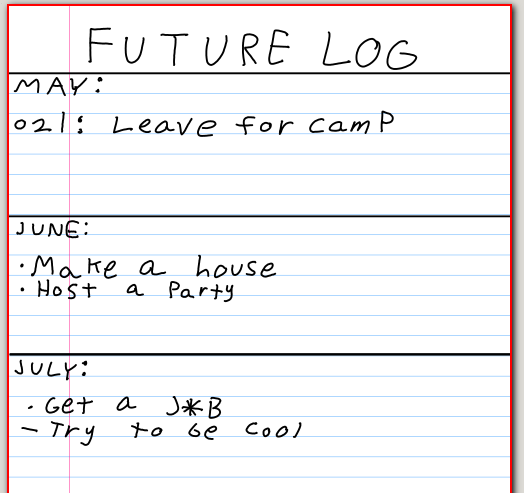
The future log acts as a list of everything that will happen in the next 6 months of your life. Here you will put scheduled events, birthdays, Appointments, and anything else that will happen in a future month.
You would setup The future log across 2 pages, with each page being divided into 3 sections with 2 horizontal lines. Put the first 3 letters of each month in each section. It should look like this.
Monthly log
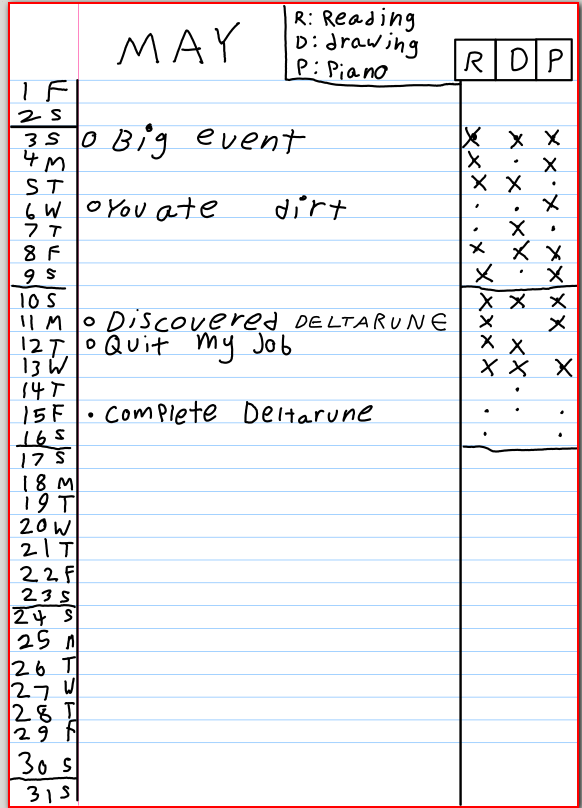
[MONTHLY LOG IMAGE HERE]The monthly log is quite similar to a traditional calender, where you get a quick overview of everything that's happening this month. You would also use the monthly log to write down tasks that you need to do that month, and events that will, or have happened that month, for example:
- Family visited (past)
- Got a new job (past)
- Doctor's appointment (Future)
- Japan vacation (Future)
Note: you don't need to actually write "(Past)" or "(Future)", it should be pretty self-explanitory.
Before anything else, you would first count the number of lines on a page. If you have less than 31 lines on a page (like me) then you would split the calender, having half of the days on the top 2/3 of one page, and half of the days on the other page. You will then use the bottom of each page (under the days) to write your task list, listing everything that you want to get done that month. If you have 31 or more lines on one page, you can allocate one page for the calender, and one for the task list.
To setup your monthly log, you will be writing the number of each date for that month at the beginning of each line, then the first letter of each day in small writing to the bottom right of the date number. After writing all days of the month, put some horizontal lines above and below the date numbers, and a vertical line to the very right of all the date numbers to keep things tidy.
You can then refer to your future log, and put all events for the current month into your monthly log on their respective dates.
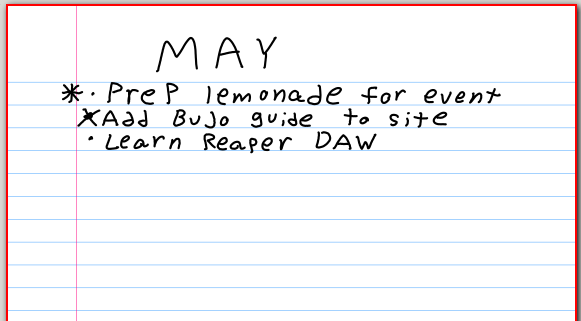
You then use one line as a title (either under your calender on both pages, or on one full page), where you would write "[Month] tasks". Under that, you would list down everything you would like to complete that month.
Daily Log
[IMAGE OF DAILY LOG]This is where things get fun. The daily log should be easy for you to use so that you actually use it, so feel free to modify how you use your daily lof however you like. With that being said, here is how I write my daily logs.
Start by writing the month and date in the "XX-XX" format (such as 12-25). Then Write down "Awoke: X:XX AM / Slept: ". I like tracking when I wake up and fall asleep, as I can see how many hours of sleep I got, and how it affected my productivity for specific days.
This next thing is a bit more complicated. We will be making an "Hourly tracker", which is something I came up with. You would first make 10 vertical lines, evenly spaced across 2 lines. If you are using a regular lined notebook, you should end up with 18 rectangular boxes. Then, in the top left of every other box, write down every other hour in very small text. For example: |6 | |8 | |10 | |, and so on. This is to easily see which hour is which, without looking too busy. You can then fill in each hour as the day goes on by:
- Using 1-2 letter entries to signify an event that is easy to recall from the letters, such as "Mo" for morning routine, "Rd" for Reading, "Dr" for drawing, etc
- Trying to write what you did in very small text within the box. This only works if you can fit what you did in a few words or less, such as "Dishes", "texted grandma", "played DTR", etc.
- Writing down a single letter in the box, then writing down what you did as an event in your daily log, linking it to that hour by writing the same letter in small text at the top left of the event symbol, such as: A o did the dishes, called my mother, swept the floor
Collections
Collections are great. Think of collections as topics. Each collection would be started with a specific use in mind. Examples of collections include:
- Grocery list
- Class notes
- general ideas and notes
- Making a song project
- Starting a business
- learning piano
- an emergency grab list
These are just a few examples, but you can make a collection about literally anything. To do so, you would simply flip to a new page, write the topic (title) at the top, and write that same topic in the index, followed by the page number.
Sometimes, it helps to create systems that are more than just a simple list or page of notes. For example, I have a grocery list collection where I leave a larger gap between the grocery list and the edge of the page, I cross of groceries as I add them to my cart, then after I get home, I write the date that I bought these groceries above the first grocery list entry in the gap between the edge of the page and the list entry, then make a downward arrow that turns right to the last entry in the list. I then write the total under the last grocery entry, then a horizontal line under that, then I can start a new list (a photo speaks 1000 words)
Migration
My tips, Tricks, and modifications
bookmarks, book cover and volume system, digital calender, daily log hourly events